Motion Soccer: Referee pc

Download Motion Soccer: Referee for PC

Published by Ivanovich Games

  • License: Free
  • Category: Games
  • Last Updated: 2026-10-09
  • File size: 983.57 MB

  • Compatibility: Requires Windows XP, Vista, 7, 8, Windows 10 and Windows 11

Download ⇩
Users Recommendation:

5/5

5
Based on 24 user votes.

Preview

->  ->  ->  

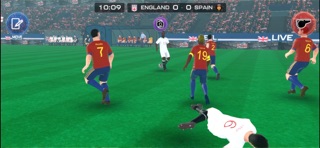
WindowsDen the one-stop for Games Pc apps presents you Motion Soccer: Referee by Ivanovich Games -- BE THE REFEREE. MAKE THE CALL. Discover the football experience of Motion Soccer PRO on mobile. Step onto the pitch as the referee in a 3D football simulator. Follow the action, call fouls, play advantage, show yellow and red cards, award penalties and review incidents with VAR. Was it a foul.. We hope you enjoyed learning about Motion Soccer: Referee. Download it today for Free. It's only 983.57 MB. Follow our tutorials below to get Motion Soccer version 1.28.2 working on Windows 10 and 11.

GET Motion Soccer for PC


After checking the 💻 Windows AppStore, we found the following Motion Soccer apps (Available for Direct download):


SN. App Download Developer
1.   Monster Soccer 3D    Download ↲ ‪Nicekidsgames‬
2.   Flicking-Soccer Download ↲ ‪Code This Lab s.r.l.‬
3.   Friends Referee Download ↲ SmartQ
4.   Penalty Kick Soccer Game Download ↲ ‪Digital Game Studio‬
5.   Penalty Kick: Soccer
Football
Download ↲ ‪Popular Peak Games‬


OR


Alternatively, download Motion Soccer APK for PC (Emulator) below:

Download Motion Soccer: Referee APK for use on PC

Download Developer Rating Reviews
Motion Soccer: Referee
Game

Download Apk for PC ↲
Ivanovich Games 4.6 11
Motion Soccer: Referee
Game

GET ↲
Ivanovich Games 4.6 11
Football Referee
Simulator

GET ↲
Vladimir Pliashkun 4.5 52
RefereeWise - Referee
tests

GET ↲
RefereeWise 3 100
Laws of the Game
GET ↲
The IFAB 4.5 56
FIFA Heroes: Soccer
Action

GET ↲
Solace Games & ENVER 3.9 556
Dream League Soccer 2026
GET ↲
First Touch Games
Ltd.
4.5 92,546

Follow Tutorial below to use Motion Soccer APK on PC:

  1. Download an Android App emulator.
    An emulator imitates/ emulates an android device on your computer, making it easy to install and run android apps from the comfort of your PC. We've listed the best below:
    1. Nox »
    2. Bluestacks »

  2. Install the Bluestacks.exe or Nox.exe Software emulator on your Windows PC.

  3. Run Motion Soccer on PC:
    1. Once installed, open the Emulator app, type Motion Soccer in the search bar and search.
    2. You will immediately see Motion Soccer. Open it and click Install. The app will start Installing.
    3. To run the Motion Soccer app on PC, open Emulator » "All Apps" » Motion Soccer: Referee.

Get Motion Soccer on Apple Mac


Download Developer Rating Score
Download Mac App Ivanovich Games 24 4.70833


Alternative Games apps

Other Apps from this Developer

keyboard_arrow_up