Joy of Coloring pc

Download Joy of Coloring for PC

Published by Texas PFCG Aplicativos Ltda

  • License: Free
  • Category: Games
  • Last Updated: 2026-09-24
  • File size: 487.06 MB

  • Compatibility: Requires Windows XP, Vista, 7, 8, Windows 10 and Windows 11

Download ⇩
Users Recommendation:

5/5

5
Based on 1 user votes.
Preview

->  ->  ->  

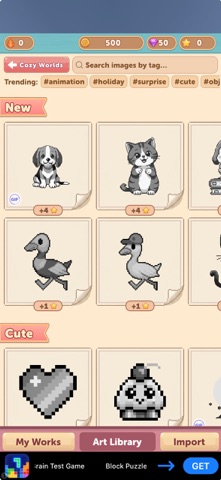
WindowsDen the one-stop for Games Pc apps presents you Joy of Coloring by Texas PFCG Aplicativos Ltda -- Color by number. Build a world. Find your calm. Joy of Coloring turns the simple act of coloring into something you’ll come back to every day. Just tap a number, watch the color flow into place, and let the stress melt away. But this isn’t just coloring: every picture you finish brings more life to your very own cosy worlds.. We hope you enjoyed learning about Joy of Coloring. Download it today for Free. It's only 487.06 MB. Follow our tutorials below to get Joy of Coloring version 1.1.0 working on Windows 10 and 11.

Follow Tutorial below to use Joy of Coloring APK on PC:

  1. Download an Android App emulator.
    An emulator imitates/ emulates an android device on your computer, making it easy to install and run android apps from the comfort of your PC. We've listed the best below:
    1. Nox »
    2. Bluestacks »

  2. Install the Bluestacks.exe or Nox.exe Software emulator on your Windows PC.

  3. Run Joy of Coloring on PC:
    1. Once installed, open the Emulator app, type Joy of Coloring in the search bar and search.
    2. You will immediately see Joy of Coloring. Open it and click Install. The app will start Installing.
    3. To run the Joy of Coloring app on PC, open Emulator » "All Apps" » Joy of Coloring.

Get Joy of Coloring on Apple Mac


Download Developer Rating Score
Download Mac App Texas PFCG Aplicativos Ltda 1 5


Alternative Games apps

Other Apps from this Developer

keyboard_arrow_up