Box Away pc

Download Box Away for PC

Published by UNICO GAMES BILISIM LIMITED SIRKETI

  • License: Free
  • Category: Games
  • Last Updated: 2026-10-06
  • File size: 328.61 MB

  • Compatibility: Requires Windows XP, Vista, 7, 8, Windows 10 and Windows 11

Download ⇩
Users Recommendation:

5/5

5
Based on 429 user votes.

Preview

->  ->  ->  

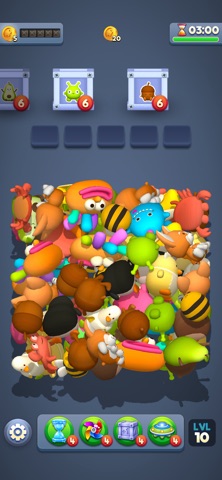
WindowsDen the one-stop for Games Pc apps presents you Box Away by UNICO GAMES BILISIM LIMITED SIRKETI -- Sort, drop & collect. Box Away is a 3D box sorting puzzle game — pick up objects, match them by type, and clear the board before it overflows. Calm your mind or chase combos. Your call. Addictive Gameplay That Keeps You Coming Back • Easy to Learn, Hard to Master: Start playing in seconds — but mastering advanced combos takes real skill. • Drop & Collect: Smooth controls let you grab 3D objects and drop them into their perfect box.. We hope you enjoyed learning about Box Away. Download it today for Free. It's only 328.61 MB. Follow our tutorials below to get Box Away version 1.030 working on Windows 10 and 11.

GET Box Away for PC


After checking the 💻 Windows AppStore, we found the following Box Away apps (Available for Direct download):


SN. App Download Developer
1.   Box Capture    Download ↲ ‪Dilgo Media‬
2.   BoxArt Download ↲ Carlos Rafael Ramirez
3.   Shopbox Download ↲ Shopbox
4.   Coverbox TV Download ↲ Coverbox
5.   Tower Boxer Download ↲ ‪GameZonePlay‬


OR


Alternatively, download Box Away APK for PC (Emulator) below:

Download Box Away APK for use on PC

Download Developer Rating Reviews
Box Away
Download Apk for PC ↲
Unico Games Studio 4.5 1,180
Box Away
GET ↲
Unico Games Studio 4.5 1,180
Box Jam! - 3D puzzle
GET ↲
Playoneer Games,
Ltd.
4.7 1,691
Take Away - Tap 3D Blocks
Out

GET ↲
EasyFun Puzzle Game
Studio
4.7 5,001
Seat Away
GET ↲
Rollic Games 3.8 1,290
CubeAway - 3DPuzzle
GET ↲
GOODROID,Inc. 4.4 2,686
Wood Away, Block Jam
GET ↲
iKame Games - Zego
Studio
4.5 394

Follow Tutorial below to use Box Away APK on PC:

  1. Download an Android App emulator.
    An emulator imitates/ emulates an android device on your computer, making it easy to install and run android apps from the comfort of your PC. We've listed the best below:
    1. Nox »
    2. Bluestacks »

  2. Install the Bluestacks.exe or Nox.exe Software emulator on your Windows PC.

  3. Run Box Away on PC:
    1. Once installed, open the Emulator app, type Box Away in the search bar and search.
    2. You will immediately see Box Away. Open it and click Install. The app will start Installing.
    3. To run the Box Away app on PC, open Emulator » "All Apps" » Box Away.

Get Box Away on Apple Mac


Download Developer Rating Score
Download Mac App UNICO GAMES BILISIM LIMITED SIRKETI 429 4.65268


Alternative Games apps

Other Apps from this Developer

keyboard_arrow_up