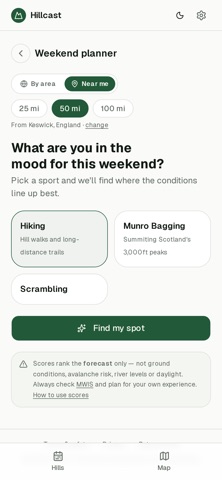
WindowsDen the one-stop for Weather Pc apps presents you Hillcast by MATTHEW ANDREW BURROWS -- Hillcast scores the mountain forecast for UK hills, so you can see at a glance which one suits the day.
Instead of cross-referencing a weather app, a route guide and a map, every hill gets a single 0–100 score based on wind, gusts, temperature, visibility, cloud and ground conditions — with a plain-English summary of what that actually means on the hill.
WHAT YOU GET
• Conditions scored for over 1,000 hills — Munros, Corbetts, Wainwrights and Nuttalls
• Today, tomorrow and the weekend, plus a 7-day breakdown per hill
• Ranked picks so you can see where's best right now
• Route guides, OS Maps routes and directions to the parking spot
• Terrain warnings for technical ground such as the Cuillin, Crib Goch and the Aonach Eagach
• Search by name, browse by area, or find what's near you
NO ACCOUNT NEEDED
Open it and use it. No sign-up, no ads.
Hill data from the Database of British and Irish Hills. Forecasts from Open-Meteo.. We hope you enjoyed learning about Hillcast. Download it today for Free. It's only 2.77 MB. Follow our tutorials below to get Hillcast version 1.0 working on Windows 10 and 11.