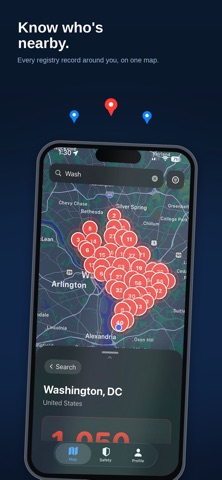
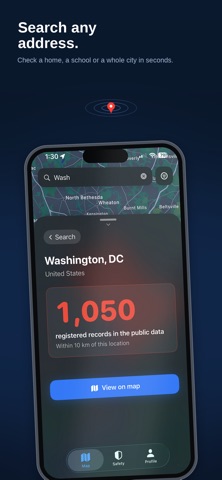
WindowsDen the one-stop for Utilities Pc apps presents you Registry Radar by Broctic Inc. -- Registry Radar maps official public sex-offender registry data, so you can see what is on the record near your home, your child's school, or anywhere you are headed.
WHAT YOU GET
- A world view: spin the globe, tap any of 176 countries, and see where records exist
- Exact locations: every record in view, pinned precisely on the map
- Full details: name, address, risk level, and last-updated date
- Official sources: every record links back to the government registry it came from
- Search anywhere: check any address, neighborhood, school, or park
- Watched places: save an address and get an alert when something new is listed nearby
- Home Screen widgets: your daily check-in and watch status at a glance
THE WORLD VIEW
Drag the globe, pinch to zoom, tap a country. Every one of 176 countries is labelled - covered, public but not integrated, or no public registry - and named with the official register it refers to. Sort countries by how much we hold, or hide the ones we cannot put a number on.
WATCHED PLACES
Add a home, a school or a relative's address and we re-check it every night, then tell you when something new is listed nearby. Watch up to ten places, choose your radius, and see exactly what we can see for each area - including when a source goes quiet.. We hope you enjoyed learning about Registry Radar. Download it today for Free. It's only 12.59 MB. Follow our tutorials below to get Registry Radar version 1.0.2 working on Windows 10 and 11.