Doz: Pill Reminder & Tracker pc

Download Doz: Pill Reminder & Tracker for PC

Published by Huy Pham

  • License: Free
  • Category: Medical
  • Last Updated: 2026-10-28
  • File size: 89.50 MB

  • Compatibility: Requires Windows XP, Vista, 7, 8, Windows 10 and Windows 11

Download ⇩
Users Recommendation:

5/5

5
Based on 5 user votes.

Preview

->  ->  ->  

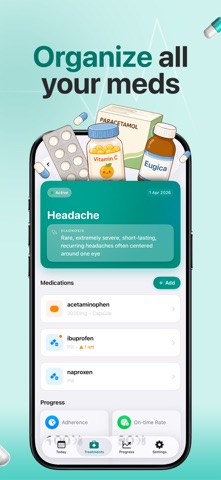
WindowsDen the one-stop for Medical Pc apps presents you Doz: Pill Reminder & Tracker by Huy Pham -- Never miss a dose again. Doz turns confusing medication routines—different pills, different times, meal instructions, multiple prescriptions—into one clear daily plan you can actually stick to. Whether you're managing a long-term prescription, a daily vitamin and supplement stack, or a birth control routine, Doz keeps everything on schedule and out of your head. BUILT FOR THE ADHD BRAIN With ADHD it's easy to lose track of whether you took your medicines, or when. Doz puts the answer where you already look: - Today's doses or your week's pill box as your Lock Screen wallpaper - A Live Activity counting down to each dose - A Last Dose widget on your Home Screen or Lock Screen PRESCRIPTION-FIRST TRACKING Doz organizes medications by prescription, so you see your full treatment plan the way your doctor intended—not just a pile of separate reminders. Each medication stays connected to the prescription it belongs to.. We hope you enjoyed learning about Doz: Pill Reminder & Tracker. Download it today for Free. It's only 89.50 MB. Follow our tutorials below to get Doz version 1.2.7 working on Windows 10 and 11.

GET Doz for PC


After checking the 💻 Windows AppStore, we found the following Doz apps (Available for Direct download):


SN. App Download Developer
1.   Medication Tracker - Pill
Reminder   
Download ↲ HomeMade Software
2.   Rx - Pill And Medication
Reminder
Download ↲ Evlar
3.   Remedy Reminder Download ↲ Athanasios Sakellaris
4.   RxRemind simplistic
medicine reminder and
tracker
Download ↲ Softarch Technologies
5.   DX-Reminder Download ↲ Batik Compusoft Lab's


OR


Alternatively, download Doz APK for PC (Emulator) below:

Download Doz: Pill Reminder & Tracker APK for use on PC

Download Developer Rating Reviews
Pillo: Pill Reminder &
Alarm

Download Apk for PC ↲
Pillo Health Inc. 4.7 5,170
Pillo: Pill Reminder &
Alarm

GET ↲
Pillo Health Inc. 4.7 5,170
EveryDose: Medication
Reminder

GET ↲
EveryDose 4.4 782
Cute Pill: Medication
Reminder

GET ↲
Futasaji LLC 4.4 51
Medisafe Pill & Med
Reminder

GET ↲
Medisafe® 4.5 28,032
Doza – Medication
Reminder

GET ↲
Metin Güner 3 100
Meds & Pill Reminder
MyTherapy

GET ↲
MyTherapy 4.5 9,148

Follow Tutorial below to use Doz APK on PC:

  1. Download an Android App emulator.
    An emulator imitates/ emulates an android device on your computer, making it easy to install and run android apps from the comfort of your PC. We've listed the best below:
    1. Nox »
    2. Bluestacks »

  2. Install the Bluestacks.exe or Nox.exe Software emulator on your Windows PC.

  3. Run Doz on PC:
    1. Once installed, open the Emulator app, type Doz in the search bar and search.
    2. You will immediately see Doz. Open it and click Install. The app will start Installing.
    3. To run the Doz app on PC, open Emulator » "All Apps" » Doz: Pill Reminder & Tracker.

Get Doz on Apple Mac


Download Developer Rating Score
Download Mac App Huy Pham 5 5


Alternative Medical apps

Other Apps from this Developer

keyboard_arrow_up