WindowsDen the one-stop for Developer Tools Pc apps presents you Mobile SSH Terminal by Binaryscript Private Limited -- Mobile Terminal is a full SSH client for iPhone and iPad. Connect to your Linux and Unix servers, run commands in a real terminal, and manage the keys you connect with — all in one app.
A REAL TERMINAL
- xterm-compatible terminal emulator with full ANSI colour support
- Scrollback, so nothing is lost when output flies past
- Ctrl, Esc, Tab and arrow keys on a dedicated key row — vim, htop, tmux and nano work properly
- One-tap quick commands: ls -la, pwd, cd . . , top, df -h
- Adjustable font size and font family, light and dark terminal themes
- Pair a Bluetooth or USB keyboard — the on-screen keys step aside
REMOTE FILES OVER SFTP
- Browse the remote filesystem with sizes, dates and permissions
- Upload and download files, and share them straight from the app
- Create, rename, delete and change permissions without a command
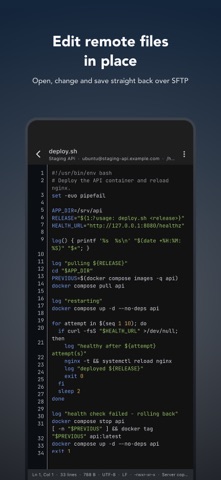
- Edit config files in place with the built-in text editor
YOUR SERVERS, ONE TAP AWAY
- Save connection profiles with name, host, port and username
- Password or SSH key authentication, chosen per connection
- Test a connection before you save it
- Reconnect to any saved server in a single tap
SSH KEY MANAGEMENT BUILT IN
- Generate RSA key pairs (2048-bit or 4096-bit) on the device
- Import an existing private key from a file, or paste it in
- View SHA256 fingerprints and copy public keys to install on a server
- Private keys go into the iOS Keychain — never plain text, never our servers
SECURITY
- Your keys and passwords stay on your device
- Optional Face ID or Touch ID lock before the app opens
- We never see, transmit or store your server credentials
- Standard SSH protocol, straight to your server, no relay in between
COMMAND HISTORY
- Every command is recorded, grouped by connection
- Search your history to find the command you ran last month
- Export or share a session's history as a text file
21 LANGUAGES
English, Hindi, Bengali, Marathi, Tamil, Telugu, Gujarati, Arabic, Chinese, Japanese, Korean, Thai, Vietnamese, Indonesian, Turkish, Russian, German, French, Spanish, Italian and Portuguese.
WHO IT IS FOR
System administrators, backend and DevOps engineers, students learning Linux, self-hosters running a home lab, and anyone who has ever needed to restart a service while away from a desk.. We hope you enjoyed learning about Mobile SSH Terminal. Download it today for Free. It's only 56.57 MB. Follow our tutorials below to get version 1.17 working on Windows 10 and 11.



 Modern SSH