WindowsDen the one-stop for Utilities Pc apps presents you HP Poly Studio Mobile by Plantronics, Inc. -- Discover how Plantronics Hub brings additional functionality to your new Plantronics Bluetooth® headset with helpful tools, notifications, and status information.
Get the following features for Poly Sync 20, Voyager Focus 2, Voyager Edge, Voyager Edge UC, Voyager Focus UC, Voyager 3200 Series, Voyager 4200 Series, Voyager 5200 Series, Voyager 6200 Series and Voyager 8200 Series:
• Use Find MyHeadset to locate your misplaced headset using an audible tone or the BackTrack feature (not available on Poly Sync 20)
• Customize settings
• Manage smart sensor options (not available on Poly Sync 20, Voyager Focus 2, Voyager 4200 Series and Voyager 6200 Series)
• Check battery level
• See headset status
• Explore headset features
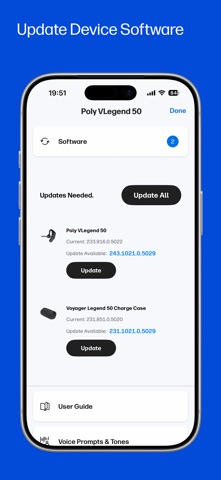
• Wirelessly update your headset firmware from your smartphone (Poly Sync 20, Voyager Focus 2, Voyager 3200 Series, Voyager 4200 Series, Voyager 5200 Series, Voyager 6200 Series, Voyager 8200 Series only)
• Change language option for your voice prompts (Poly Sync 20, Voyager Focus 2, Voyager 3200 Series, Voyager 4200 Series, Voyager 5200 Series, Voyager 6200 Series, Voyager 8200 Series, Voyager Edge and Voyager Edge UC only)
• Enable headset support for Amazon Alexa and locate your lost headset with new Find With Tile support (Voyager 4200 Series and Voyager 5200 Series)
Get the following features for Plantronics Voyager Legend, Voyager Legend UC, BackBeat FIT, BackBeat PRO, BackBeat PRO+, BackBeat PRO 2, BackBeat SENSE, BackBeat FIT 500 Series, BackBeat 500 Series, BackBeat FIT 300 Series, BackBeat GO 600 Series, BackBeat 100, BackBeat GO 2, BackBeat GO 3, Calisto 5300, Voyager PRO HD, Voyager 100 Series, Explorer 10, Explorer 50, Explorer 80, Explorer 100, Explorer 500 Series, Marque M155, Marque 2 M165, Marque 2 A170, Marque 2 M180, M25 Series, M55, M70 Series, and M90 Series:
• Use the Find MyHeadset feature to locate your misplaced headset using an audible tone or the BackTrack feature
• Monitor battery level
• See headset status
• Explore headset features
Requirements:
• iPhone 5S and higher
• iOS 12 and higher
©2021 Plantronics, Inc. BackBeat, Find MyHeadset, Plantronics, Voyager, and Voyager Legend are trademarks of Plantronics, Inc. registered in the US and other countries. BackTrack, Explorer, Marque, M25, M55, M70, M90, M180, and Plantronics Hub are trademarks of Plantronics, Inc. iPhone is a trademark of Apple Inc.. We hope you enjoyed learning about HP Poly Studio Mobile. Download it today for Free. It's only 23.22 MB. Follow our tutorials below to get HP Poly Studio version 5.2.0 working on Windows 10 and 11.



 Barcode Lens
 Therapy Lens